Import what you already use
Load Rekordbox, Serato, playlist files, JSON/CSV exports, USB libraries, or plain folders without rebuilding your life inside a new app.
djex is best at one job: turning messy DJ libraries and playlists into clean, safe, portable copies for USBs, backups, clients, cars, CDJs, phones, and other players. You choose the tracks, names, formats, and cues. djex does the prep. You stay in charge.
Read-only by default. Copy-only by design.
Works with
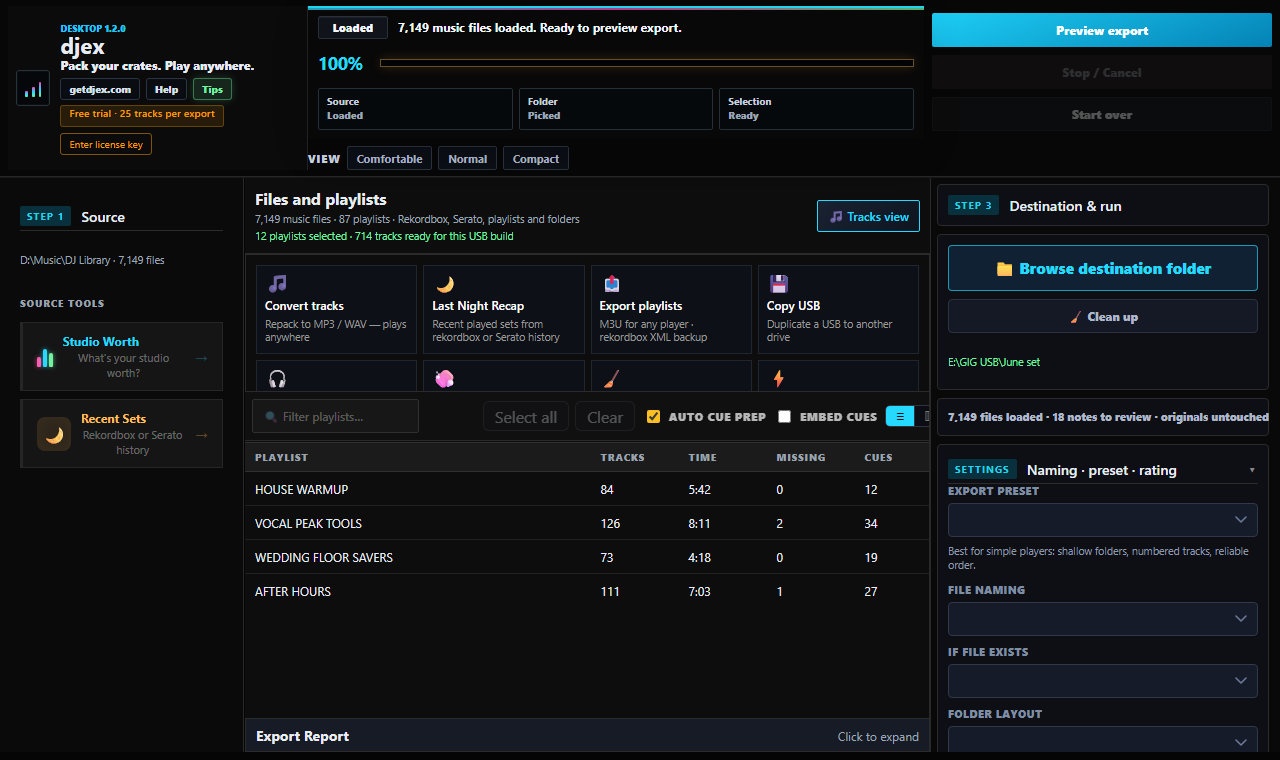
87 playlists, ready to preview before export.
Suggested intro and mix-out markers. You approve what gets used.
Bring crates from the software you already use.
djex writes clean copies to the destination folder.
Years of crates means mixed formats, moved folders, missing files, odd cue data, ripped CDs, private edits, and playlists spread across different DJ apps. djex turns that uncertainty into a visible prep list before the gig, client handoff, car ride, or USB build.
It is not trying to own your library. It gives you a clean working copy, a preview before you commit, and enough information to make your own call.
Load Rekordbox, Serato, playlist files, JSON/CSV exports, USB libraries, or plain folders without rebuilding your life inside a new app.
BPM and Camelot key analysis runs locally. No upload queue, no account, no cloud copy of your music.
Use BPM, key, genre, year, playlist order, and other naming schemes so the folder makes sense on a CDJ, car stereo, TV, or phone.
Copy as-is, or convert to MP3/WAV for the player in front of you. djex prepares the output. You decide the tradeoff.
Auto Cue Prep uses BPM, duration, phrase math, first-kick estimates, and music-theory timing to suggest intro and mix-out markers. They are helpers, not orders.
Right-click a track to find local matches by compatible Camelot key, close BPM, genre, rating, playlist context, and playable-file status.
djex turns the messy parts of gig prep into a short, visible workflow. Rekordbox libraries work directly, and exported playlists from Serato, VirtualDJ, Engine DJ, iTunes, or Traktor can come in through M3U, CSV, JSON, or folders.
Bring your crates from DJ software exports, playlists, CSV, JSON, USB libraries, or plain music folders. Drop it in and see what you have.
See missing files, unsafe formats, weak metadata, duplicate names, CDJ notes, cue suggestions, and mixable-track ideas. You decide what to fix, skip, convert, or carry as-is.
Copy or convert to MP3/WAV, keep originals untouched, and create a USB-ready structure you can trust.
That text always arrives after the party, wedding, bar night, or private gig. djex helps turn a history export or playlist into actual playable files: clean names, usable formats, and a folder ready for AirDrop, WeTransfer, a client drive, or a backup USB.
Not just a path list. A real folder someone can play.
Load a library and djex gives you a clear picture of what you built: tracks, hours, playlists, metadata quality, missing files, and a Gig Readiness Score. It is information, not a verdict.
MY DJ LIBRARY REPORT
7,149 tracks foundThe free version is real, not a fake demo. You can load, scan, analyze, view, preview, and learn your library before paying.
Try the workflow with real crates. Export up to 25 tracks and see the report without a credit card.
After trial, keep importing, analyzing, viewing, playing, and previewing. Final export actions stay limited.
Unlimited exports, conversion, rename, cue write/conversion, and client-ready package prep.
No cloud uploads, no account required to scan, no library analytics. Your music stays where it is.
djex writes to a destination folder. Rekordbox libraries, Serato exports, playlists, folders, source files, cues, and ratings stay untouched. Never touch the holy original. Even a tiny chance of corrupting a DJ library is too much.
Private edits, promos, rips, odd folders. djex prepares the gig. It does not police the library.
Founder Price - $15 lifetime. Fair access for working DJs, hobbyists, students, wedding DJs, and music lovers with years of playlists. No subscription pressure.
lifetime license
From CD-era ripping and backups to today's mixed-format libraries, djex comes from the same old DJ instinct: protect the originals, make a clean working copy, and know the music will play before you leave the house.
Scan your plugin folder, see the MSRP value of what you built, and share the card. 100% local.
No. djex reads safely and writes new copies to the destination you choose. There is a very small chance any direct database edit can go wrong, and for a working DJ that is enough reason not to do it.
You can import, scan, analyze, preview, and export up to 25 tracks. Reports stay free.
Yes. Activation needs the internet once so your license can be registered. After that, djex stores a signed local license file and never phones home again. Basement gigs work.
It binds the license to you so a copied key cannot be passed around. The sign-in happens at activation only. No daily checks, no hidden background ping.
Yes. One license covers up to 5 computers, because a DJ setup is usually a studio machine, a gig laptop, a backup, and one or two spares.
Lemon Squeezy handles checkout, tax, receipts, and license delivery. djex keeps the app local: after one-time activation, it reads your local license file and keeps working offline.